
MT4Utility
Rhino Drawing Tools MT4
TradingView-style drawing workflow for MetaTrader 4 with 54 tools, a customizable toolbar and object management.
- Platform
- MetaTrader 4
- Type
- Utility
- Price
- from $30
- Free demo
- Yes
Description
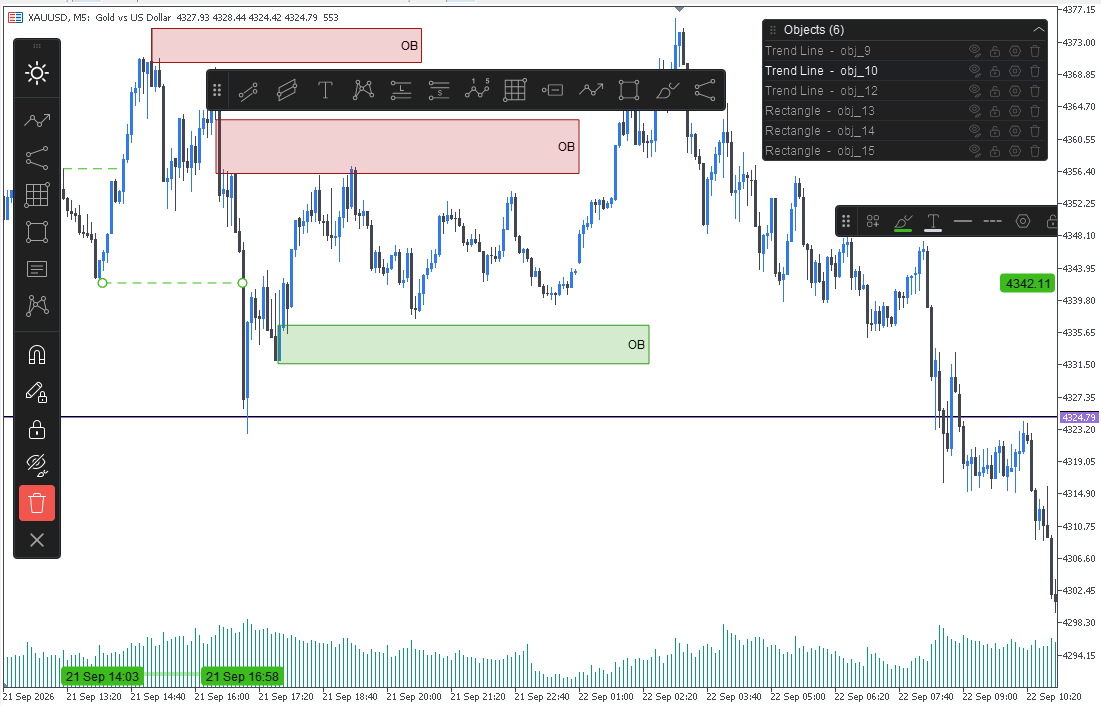
Rhino Drawing Tools MT4 brings a TradingView-style drawing workflow to MetaTrader 4.
54 drawing tools in 9 groups
| Group | Tools |
|---|---|
| Lines | Trend line, ray, extended line, horizontal / vertical line, horizontal ray, cross line, trend angle, arrow, path, polyline, info line |
| Channels | Parallel, regression, flat and disjoint channels, pitchfork |
| Fibonacci | Retracement, extension, channel, speed fan, time zones |
| Gann | Gann box and Gann fan |
| Shapes | Rectangle, rotated rectangle, ellipse, circle, triangle, polyline |
| Annotations | Text, note, callout, price label, signpost, flag, arrow marks |
| Patterns | XABCD, ABCD, Cypher, Head and Shoulders, triangle, three drives, Elliott impulse and correction |
| Projection | Long / short position, forecast, price range, date range, date & price range |
| Brushes | Freehand brush and highlighter |
Core features
- Time / price coordinates — objects stay on their bars and price levels when you zoom, scroll, resize or change timeframe. Coordinates can also be typed in directly for precise placement.
- Object settings panel — style, text, coordinates, visibility and levels, with a live preview and a Cancel that restores the previous settings
- Toolbar, favorites & object manager — tools grouped by type, a favorites strip for the ones you use most, and a list where every drawing can be shown, hidden, locked, edited or deleted. Light and dark themes.
- Quick styling & templates — change colors, width and line style straight from the selection bar, then save the look as a template and reuse it on other drawings. Templates survive a MetaTrader restart.
- Text on the chart — double-click an object to edit its caption, Shift + Enter for a new line, and text that follows the angle of sloping objects
- Vector rendering — anti-aliased lines, transparent fills, dashed and dotted styles. Hold Shift while dragging to move along one axis only.
- Drawing lock & object lock — stop new objects being created, or stop existing ones being moved by accident
The drawing layer works alongside MetaTrader's own chart objects, so you can keep using both on the same chart.
This is a chart drawing and analysis tool only. It does not place trades, send orders or modify open positions and pending orders.
Screenshots
Choose your plan
Purchase and activation are handled securely by the official MQL5 Market.
Best value Lifetime$45one-time paymentBuy on MQL5
- Use it forever
- All future updates
- Support from the author
- Full version
- Updates during rental
- Upgrade to lifetime anytime
- Runs in the Strategy Tester
- No payment needed